


Is your vacuum cleaner not picking up dirt like it used to? You rely on it to keep your home clean, but over time, its performance can drop without you even noticing.
What if you could easily boost its power and make it work like new again? You’ll discover simple, effective steps to maintain your vacuum cleaner’s performance. Follow these tips, and you’ll save time, money, and avoid frustration with a cleaner that always does its job right.
Keep reading to unlock the secrets to a powerful, long-lasting vacuum cleaner!
Credit: www.miuzzyglobal.com
Choosing The Right Vacuum
Different vacuum cleaner types work best for certain floors. Upright vacuums suit carpets well. Canister vacuums are good for hard floors and stairs. Stick vacuums are light and easy for quick cleaning. Robot vacuums clean floors automatically but may miss corners.
Matching vacuum to floor type keeps your home clean and protects floors. Use soft brushes on hardwood to avoid scratches. Carpets need strong brushes to lift dirt deep inside. Rugs require gentle suction to prevent damage.
Suction power matters a lot. Strong suction cleans better but may use more energy. Adjustable suction lets you pick the right power for each floor. Check vacuum specs to find models with good suction for your needs.
Regular Filter Care
Vacuum cleaners need clean filters to work well. There are three main types of filters: foam, HEPA, and cartridge. Foam filters catch big dust, HEPA traps tiny dust particles, and cartridge filters do both. Check the filter often for dust and dirt build-up. Clogged filters make the vacuum weak and noisy. Signs of clogged filters include less suction and a burning smell.
Cleaning foam filters is easy. Rinse them with water and let them dry fully. HEPA and cartridge filters usually need replacement, not washing. Replace filters every 3 to 6 months or as the manual says. This keeps the vacuum working like new.
Maintaining The Brush Roll
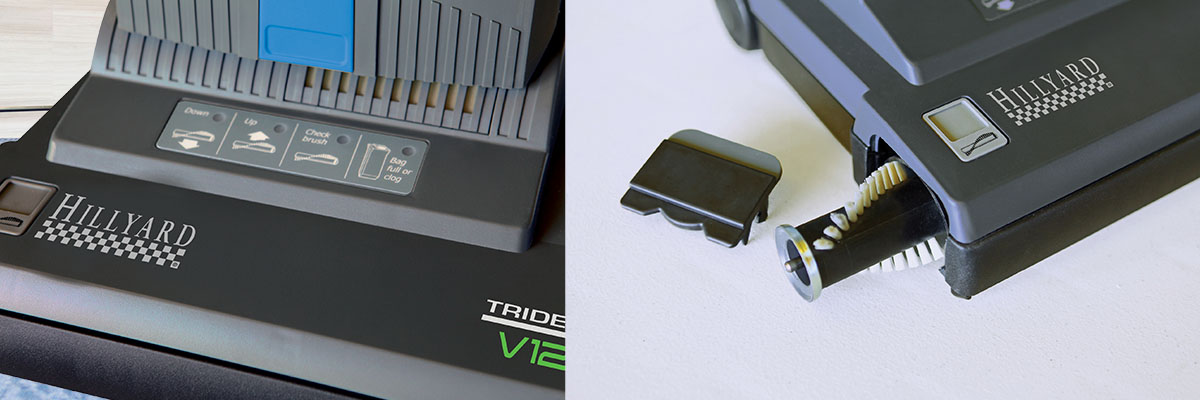
Remove hair and debris from the brush roll often. Use scissors or fingers to clear tangled threads. This keeps the brush spinning well.
Check the brush roll for wear and tear. Look for missing bristles or cracks. Replace the brush if it looks damaged.
Adjust the brush height based on your floor type. A lower setting works for carpets. A higher setting is best for hard floors. This helps the brush clean properly without damage.
Credit: www.miuzzyglobal.com
Emptying And Cleaning The Dust Bin
Empty the dust bin regularly to keep your vacuum working well. Dispose of the dust and dirt into a trash bag carefully. Avoid spilling to keep the area clean and safe.
Wash the dust bin with warm water and mild soap. Let it dry completely before using it again. This helps stop bad smells and dust from building up inside.
Never let the dust bin get too full. Overfilling can block the vacuum and lower its power. Empty it when it reaches about two-thirds full for best results.
Inspecting And Cleaning Hoses
Blockages in vacuum hoses can reduce suction power. Check by detaching the hose and looking through it. Shine a light inside to spot any dirt or objects stuck inside. Sometimes, debris like hair or dust balls cause clogs.
Use a long, flexible brush or a broomstick to gently remove blockages. Avoid using sharp tools that could damage the hose. After clearing, run water through the hose to flush out leftover dirt. Let it dry completely before reattaching.
Keep the hose flexible and free from cracks by storing it properly. Avoid bending it sharply or pulling it too hard. Regularly inspect the hose for holes or weak spots. Replace damaged hoses to maintain strong vacuum performance.
Checking Vacuum Belts
Check the vacuum belt often for any cracks, tears, or worn spots. A damaged belt will stop the vacuum from working well. Look closely for stretching or brittleness. These signs mean the belt needs replacement.
Replace belts that look old or broken. Make sure to buy the correct size and type for your vacuum model. Follow the manual to remove the old belt safely. Put the new belt on the motor and brush roller carefully.
The belt must have the right tension. Too loose and it slips; too tight and it breaks. Check that the belt fits snugly but can still move a bit. Adjust the tension by moving parts if needed. This keeps the vacuum running smoothly and efficiently.
Storing Your Vacuum Properly
Choose a dry, cool place to store your vacuum. Avoid spots with direct sunlight or heat sources. This helps keep parts from wearing out fast.
Keep the power cord wrapped loosely. Do not bend or pull it too tight. This stops cord damage and keeps the vacuum safe to use.
Protect the vacuum from moisture. Store it away from damp areas like bathrooms or basements. Moisture can cause parts to rust or break.
Credit: www.hillyard.com
Scheduling Regular Servicing
Regular servicing keeps your vacuum cleaner working well. Service it every 6 to 12 months, depending on use. Heavy use needs more frequent checks. Light use can stretch the time between services.
Professional maintenance helps spot issues early. Experts clean filters, check belts, and clear blockages. They also test suction power to ensure it stays strong.
Simple DIY troubleshooting can fix small problems. Check if the brush rolls spin freely. Clear hair or dirt wrapped around them. Empty the dustbin or replace bags on time. Clean or replace filters regularly to keep air flowing.
Frequently Asked Questions
How Often Should I Clean Vacuum Filters?
Clean vacuum filters every 1-3 months to maintain suction power. Dirty filters reduce performance and can damage the motor. Check the user manual for specific cleaning instructions for your model.
What Is The Best Way To Prevent Vacuum Clogs?
Regularly empty the dustbin or bag before it’s full. Clear the hose and brushroll of debris to avoid blockages. Using proper attachments also helps prevent clogs in tight spaces.
How Can I Improve Vacuum Suction Strength?
Ensure filters and bags are clean and correctly installed. Check for hose blockages and clean brushrolls frequently. Proper maintenance keeps suction strong and efficient over time.
Why Is Vacuum Brushroll Maintenance Important?
A clean brushroll picks up dirt and hair effectively. Tangled hair or threads reduce cleaning efficiency and strain the motor. Regularly removing debris extends vacuum lifespan and improves performance.
Conclusion
Regular cleaning keeps your vacuum working well and lasting longer. Check filters and bags often for clogs or dirt. Clear the brush roll to avoid hair buildup. Store the vacuum in a dry place to protect it. Small steps make a big difference in performance.
A well-maintained vacuum saves time and energy. Keep these tips in mind for a cleaner home. Easy care leads to better results every time.
